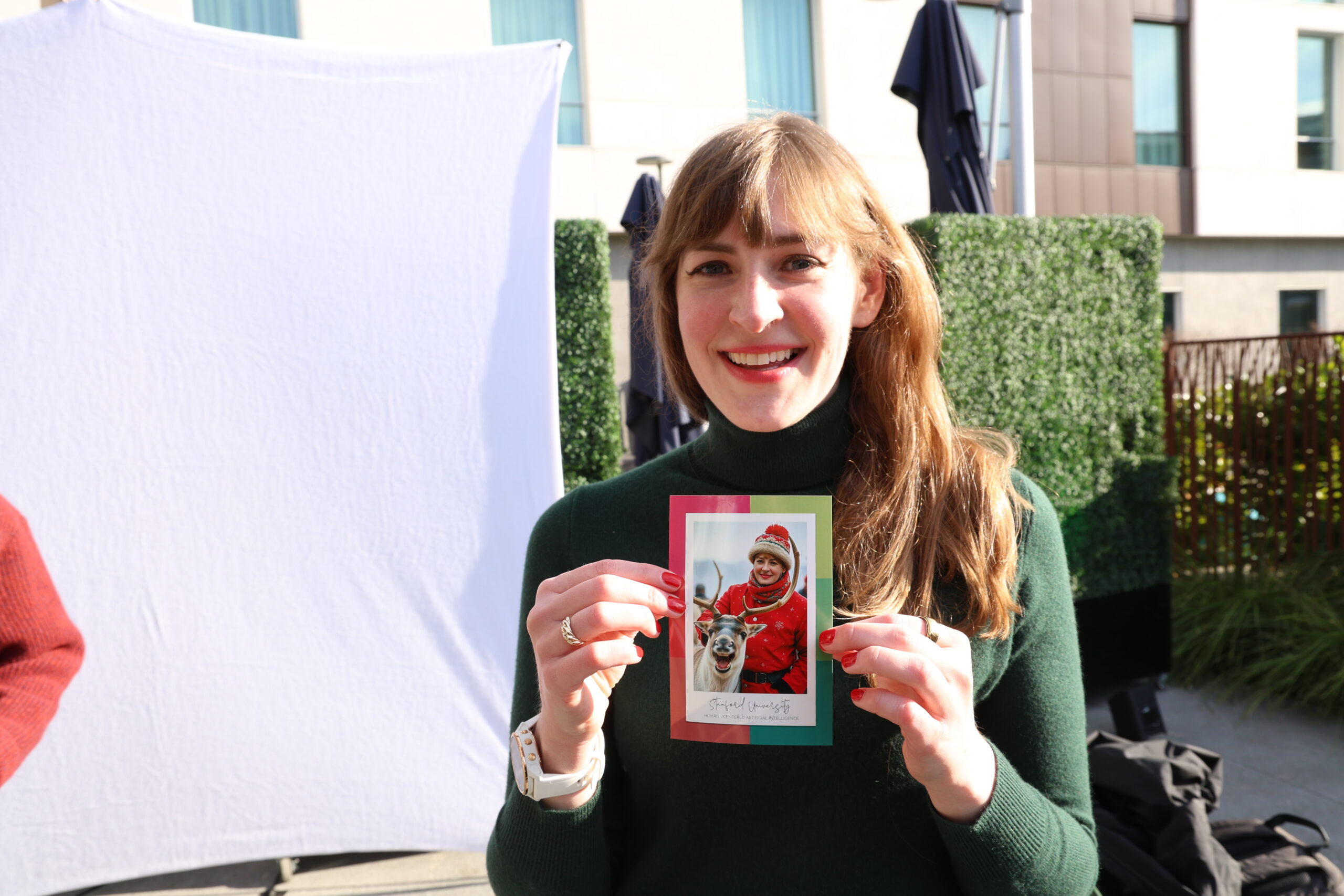
For a company party, I recommend looking beyond the first impressive sample. Will guests recognize themselves? Does the style suit your team? Can people get their image without spending so much time at the reception waiting area? Those are the questions worth answering before you approve the artwork.
Guests should be able to enjoy the transformation and understand what to do next without a long explanation.
What does an AI holiday photo booth create?
An AI photo booth uses a guest’s source photograph to generate a new portrait in an approved visual style. That might be an illustration, a themed environment or a design built around your event. The generated image can then sit inside a controlled layout with your company branding.
Our AI Photo Booth experience includes creative development and testing before the event. We plan digital delivery and any printing around your event scope, so those choices belong in the initial conversation.
For a holiday party, you could explore an illustrated winter travel poster, an editorial portrait with a seasonal setting or a playful collectible-style image. Treat those as concepts to test. Image generation can vary, so the approval process should cover a range of results rather than one favorite picture.
Choose how much of the guest should change
There’s a big creative difference between placing a guest in a new environment and transforming their clothing, hairstyle and overall appearance. Decide which parts of the photograph are central to the experience.
If your guests are attending in formalwear, they may want that effort reflected in the final portrait. If the party centers on a fictional winter world, a more illustrated result could suit the final image. Neither approach should be selected without considering the people who will use it.
Tell us what you want to preserve. You might want recognizable facial features and glasses, with a new background and illustrated clothing. You might prefer a lighter change that keeps the guest’s outfit. That gives us something specific to test.
I recommend starting with a few clearly different styles. Guests can choose more easily when they understand the options at a glance, and your team has fewer designs to approve.
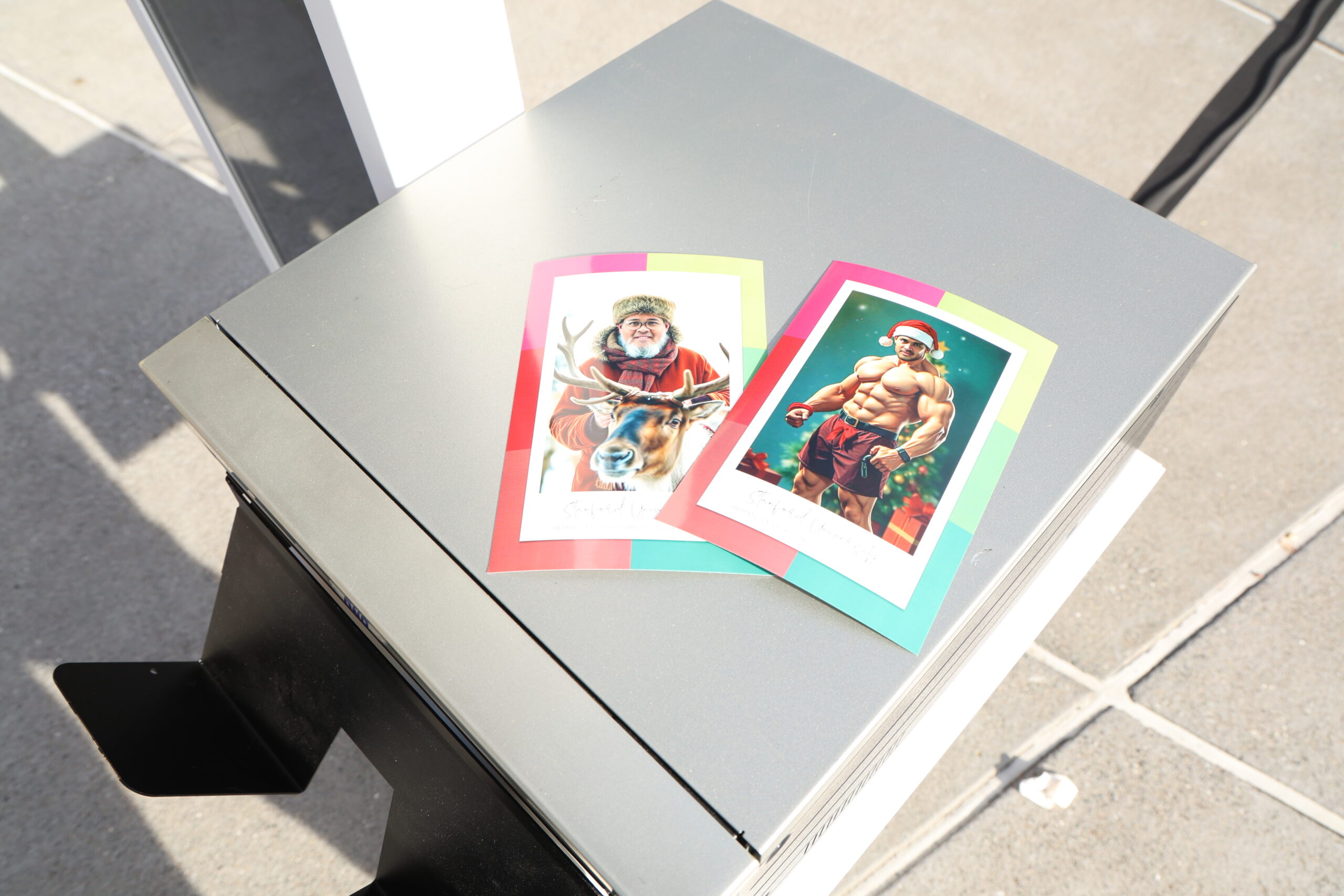
The two printed examples pictured below show why this choice matters. One uses winter clothing and a reindeer; the other turns the guest into an exaggerated Santa-style character. The photo templates match, but the portraits make very different creative choices. Approve the degree of transformation as carefully as the scenery, especially when employees may prefer to keep their own clothing or a more natural appearance.
Review the style across a useful test set
Ask to review examples representing the likely range of participants, using images the team has permission to process. Include glasses, different hairstyles, varied lighting conditions and the portrait framing you expect to use.
Look beyond whether the scene is attractive. Check the eyes, hands, clothing edges and any objects near the face. Check whether the guest remains recognizable and whether the output introduces distracting details.
If you want group portraits, approve group examples specifically. A style that works for one person doesn’t establish that it will work equally well for several people. Confirm the supported group size and whether the composition changes.
Agree on an acceptable result and a retry process. The purpose of testing is to find weaknesses while there is still time to revise the concept. It should also make clear which requests the setup can support consistently.
Keep exact company branding under design control
Company names, logos and dates need to be accurate. A practical approach is to create the portrait first and place approved branding in a separate layout. That makes the final text easier to proof and keeps it consistent across guests.
Review the frame at the actual output size. A logo that looks balanced on a large monitor may be too small on a phone or too close to a print trim edge. Leave room around faces, and check whether the portrait crop works for both digital and printed versions.
For a winter postcard concept, for example, the illustrated scene could change around each person while the company name, holiday greeting and 2026 event date remain fixed in the surrounding design.
Assign one person on your team to give final creative approval. Conflicting changes from several departments can delay production and produce a design nobody intended.
Plan the steps between capture and delivery
The camera capture, image generation and final delivery are separate stages. Ask which stages keep the guest at the station and which can happen after they step away.
A useful planning discussion covers:
- How guests choose or confirm the approved style.
- Whether they review the source photograph before it’s processed.
- How they know where and when to receive the finished image.
- Who assists with an unsuccessful or unsuitable result.
- How prints are distributed if printing is included.
Don’t build the evening around an untested processing-time promise. Generation and delivery can depend on the chosen treatment, internet connection and service conditions. Ask for the expected workflow for your specific event, including how the team will communicate a delay.
For an office or hotel venue, share any network access requirements in advance. A venue’s general statement that Wi-Fi is available doesn’t confirm that the production setup can connect and work as intended.
Decide what guests need to know about their photos
Tell guests plainly that the experience uses AI to transform their image. Explain how they receive the result and who can access any event gallery. This information should be easy to understand before someone participates.
If your organization has requirements for image handling, have the appropriate internal team review them with the provider. Ask how source photos and generated images are handled, whether an external service processes them and what retention or deletion arrangements apply.
Keep participation separate from optional marketing uses. An employee wanting a holiday portrait should understand any additional permission being requested. If your team plans to publish selected images later, confirm that use before collecting them.
A real ONe, Two, Smile! Photobooth holiday example at The Hibernia
For Google’s 2024 Holiday Party at The Hibernia in San Francisco, we provided an AI Photo Booth for an event with approximately 250 guests. The event produced more than 300 captures over four hours, as documented on our AI Photo Booth page.
Those are totals from that particular event. Captures aren’t the same as unique guests, and a different creative treatment or delivery setup can change the pace. For your party, we need to look at the planned activity and the time guests will have to use it.
What should be settled before the event?
| Approval | What your team should see |
|---|---|
| Creative style | Several representative results, including the intended portrait framing |
| Branding | Final logos, spelling, event date and output layouts |
| Guest experience | The steps from arrival through delivery and the approach to retries |
| Venue setup | Operating area, power, connectivity and access plan |
| Photo handling | Participant information, gallery access and agreed retention arrangements |
Frequently asked questions
Can an AI holiday photo booth create Christmas-themed portraits?
Yes, a Christmas concept can be developed through the creative approval process. A winter or year-end design is another option. The exact treatment should be tested and confirmed for your event.
Will every AI portrait look exactly like the sample?
No. Generated details can vary between images. The sample establishes the intended direction; broader testing and a clear retry process help define the results your team is comfortable approving.
Can guests receive a printed AI portrait?
Printing can be included in an OTS AI experience when it’s part of the agreed scope. Confirm the print format, quantity, distribution process and digital delivery at the proposal stage.
If you want the original photo and AI portrait in one keepsake, ask about AI lenticular prints. Review both images and confirm the finishing and pickup plan before the event.
Summary
Before approving an AI holiday booth, review what changes in the portrait, what stays recognizable and how guests receive the result. The sample image is one part of that decision. Branding, representative testing, photo handling and the plan for delayed or unsuitable results all belong in the final event scope.
Key takeaways
- Test the intended style on a range of portraits, including group photos if groups are part of the experience.
- Keep exact logos, names and dates in an approved layout that can be checked independently of the generated image.
- Confirm which steps occupy the capture station and how guests collect digital files or prints.
- Agree on retries, guest information and gallery access before the event.
Plan your AI holiday experience
Explore our holiday party photo booth options as you plan the experience.
Have an idea for your 2026 holiday party? Send us your date and creative brief, plus the venue, guest estimate, budget range and preferred delivery. We can discuss an AI experience that fits your celebration in San Francisco, San Jose or elsewhere in the Bay Area and nationwide.