A 360 photo booth can give your year-end corporate celebration a shared activity and a short video guests can take home. It works especially well when you have room for a platform, a camera arm and a comfortable guest queue, and when a moving clip fits the kind of keepsake you want to offer.
Updated November 9, 2026: We refreshed this guide with practical advice on booth space, guest flow, creative approvals and video delivery for company celebrations.
How does a 360 photo booth work?
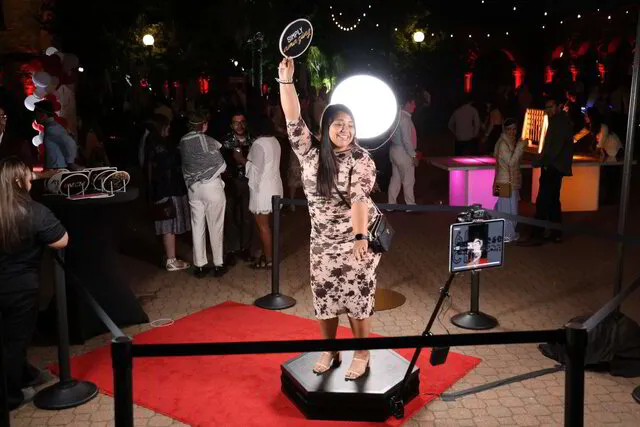
Guests step onto a stationary platform while a camera moves around them to record a short clip. Our attendant helps each group get positioned and explains where to stand. We then prepare the video with the event’s approved design, music and effects, and guests can receive it digitally.
There’s no need for everyone to dance or perform. A simple pose, a team cheer or a few seconds celebrating together can work just as well. For a closer look at the setup and available platform sizes, explore our 360 photo booth experience.
Why consider one for a company celebration?
A 360 booth gives coworkers an activity they can enjoy in small groups during a reception, awards night, company party or team celebration. The finished video is different from a still photo, so start by deciding whether guests would prefer a clip, a printed portrait or a mix of both.
It can also reflect your event without making the design feel like an advertisement. A simple logo, a color palette from your invitation or a message celebrating the team can be enough. Share your artwork and brand guidelines early so we can confirm the video treatment before the event.

Plan the space around the entire experience
The platform is only one part of the footprint. Allow room for the rotating camera arm, lighting, the attendant, guests entering and exiting, and a queue that doesn’t block doors or accessible routes. Share your floor plan so we can confirm the space needed for your specific setup and venue.
Choose a visible location that works with the rest of the room. If speeches, dinner or an awards presentation will occupy the main space, talk through the schedule and sound with your venue team. An attendant can help guests understand the experience and manage the flow, but the right location still matters.
Fit the booth into your event schedule
Look at the moments when guests are free to participate. A welcome reception, a break between program segments or an after-party may make more sense than the middle of a presentation. Share your guest count, operating hours and the timing of any short shared breaks so we can plan around the busiest period.
If the venue uses several rooms, identify where people will spend their time. One well-placed station may work; a second experience may be useful if guests are separated or you also want still photos. Our multi-booth planning guide covers the questions to ask before adding another station.
Approve the video and delivery plan
Before the event, review the overlay, colors, any logo placement, music and effects. Ask to see how the design will look on the finished video. If your organization has rules about music or how employee images may be used, share them during planning rather than assuming the same arrangements apply to every event.
Guests can receive clips digitally through the delivery options agreed for the event. A reliable connection supports timely delivery; if connectivity drops, messages can be queued and sent when service returns. Confirm the venue’s internet and power arrangements with us, along with who can access the event gallery and for how long.
Receiving a video and posting it publicly are separate choices. Let guests know how their clips will be delivered and how any event gallery or company use will work. Discuss any photo release, consent or marketing permissions separately before collecting information for those purposes.
What if you also want photos?
A 360 booth creates video rather than a printed portrait. If your team wants a photograph to take home as well, an Open Air Photo Booth can provide a separate group-photo experience. Consider your room, budget, staffing and schedule before choosing two stations. Our holiday photo booth options offer more ways to match the keepsake to the party.
Questions to ask before booking
- Where can the platform, camera arm, lighting and queue fit safely?
- When will guests have time to visit during the program?
- Which platform size makes sense for the groups you expect?
- What are the venue’s load-in, power, internet and operating rules?
- Who approves the overlay, music and final video treatment?
- How will guests receive videos, and who can access the gallery?
Plan your year-end 360 experience
Tell us your date, venue, guest count and what you’d like people to take home. If you have a floor plan or event schedule, send that too. We’ll help you decide whether a 360 booth fits the celebration and confirm the setup, staffing and delivery in your proposal.
Request a 360 photo booth quote or call (510) 463-4972.